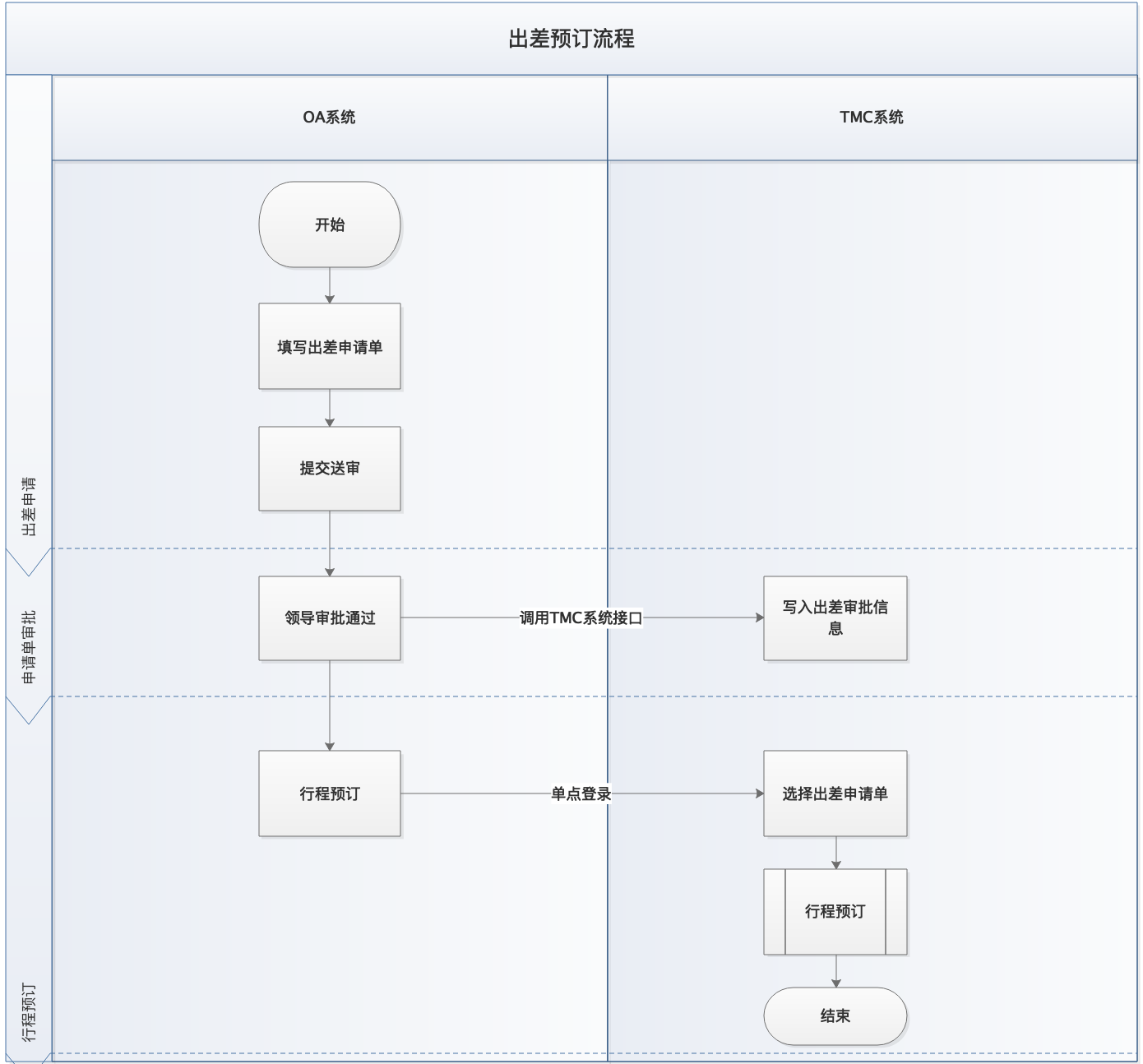
领端科技现对外提供两种对接流程:
1. 标准流程对接:单点登录跳转至商旅系统进行查询预订,待出票后通过消息通知获取所需订单数据
2. 全流程对接:OA系统使用标准化openAPI接口对接航班查询预订出票流程。
对接术语说明:
1. timestamp:时间戳,时间戳是指格林威治时间1970年01月01日00时00分00秒(北京时间1970年01月01日08时00分00秒)起至现在的总豪秒数
2. key:差旅服务商提供的秘钥,用于接口通讯时进行签名验证程。
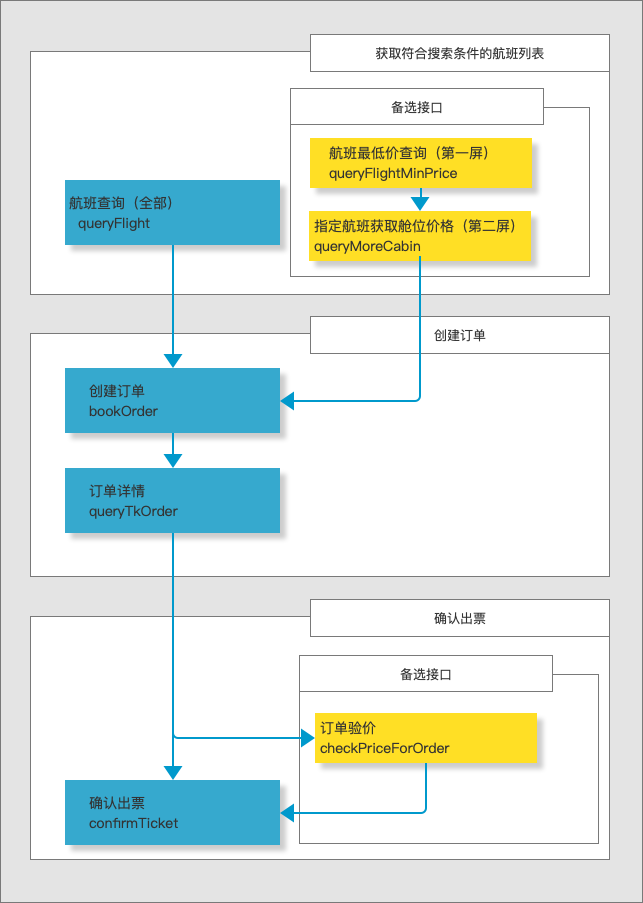
OA全流程对接,是指在OA系统中通过标准接口获取航班、舱位和产品价格等信息,在OA系统中实现机票预订出票功能。
下面流程图中使用的不同颜色:蓝色为必选接口,黄色为备选接口。
http://oa.lingduankeji.com/comm/default/sso/loginTurn?loginName=18627112565&loginCli=p×tamp=1552983831588&sign=0789a3bc8166cd00e3bae991f859ef26&corpId=eb293a26d815461a98ea8a6cce85de35测试环境地址
http://oa.lingduankeji.com/comm/default/sso/loginTurn
生产环境地址
上线前提供| 参数 | 说明 |
|---|---|
| corpId | 企业唯一代号,由差旅服务商提供 不能为空 |
| loginName | 手机号或工号 不能为空 |
| loginCli | 跳转的目标系统 m=跳转到H5端(微信公众号或APP使用) p=跳转到PC端 可为空,为空时将根据用户终端类型进行自动识别跳转 |
| travelNo | 出差申请单号,可为空。不为空时,必须先将申请单同步到商旅系统,当跳转至目标界面后,搜索框会默认选中 |
| orderNo | 订单编号,如果要跳转到订单列表,非必传,传入订单编号,则直接查询出订单; 如果跳转订单详情页面,订单编号必须传入中 |
| targetModule | 目标界面,可为空。为空时默认国内机票搜索界面。不为空时可传参数:1 首页; 2_1 国内机票首页查询; 2_2 国内酒店首页查询; 2_3 国内火车票首页查询;3_0 全部订单列表; 3_1 机票订单列表; 3_2 酒店订单列表; 3_3 火车票订单列表; |
| timestamp | 时间戳,为空则不验证,如果不为空,则时间戳距离当前时间不能超过5分钟 |
| sign | 签名 MD5(timestamp+"&"+key) 其中key是约定好的秘钥,由差旅服务商提供 为空则不验证 |
- 如以上不能满足贵司OA系统的技术规范要求,或者贵司有其他个性化要求,需与技术沟通明确对接方案和所使用的技术规范后才能进行开发。
- 时间戳及sign生成验证方式:http://oa.lingduankeji.com/comm/generateOaLoginSign?key=XXXXXX
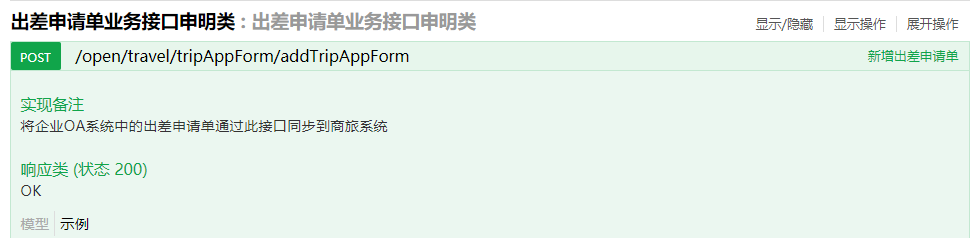
http://oss-server.lingduankeji.com/static/dist/index.html?url=/v2/api-docs?group=forOpenApi
账号 ldkj 密码 openapi135测试环境地址
http://oss-server.lingduankeji.com
生产环境地址
上线前提供
- eg:如对接新增出差申请单接口,则接口完整的url地址为:
- http://oss-server.lingduankeji.com/open/travel/tripAppForm/addTripAppForm
| 参数 | 参数类型 | 数据类型 | 描述 |
|---|---|---|---|
| reqType | header | string | 请求来源,固定值8 |
| corpId | header | string | 企业ID |
| timestamp | header | string | 请求时间戳,时间戳距离当前时间不能超过5分钟 |
| user | header | string | 员工在商旅系统注册并开通的工号 |
| sign | header | string | MD5(key+"&"+MD5(corpId+"&"+timestamp)),key由服务商提供,测试环境key可以使用空字符串 |
| 参数 | 类型 | 描述 | NULL | 备注 |
|---|---|---|---|---|
| errCode | String | 错误代码 | N | 业务错误代码 1表示成功,其他值的含义参见具体业务接口文档。 |
| errMsg | String | 错误说明 | N | 业务处理失败时,异常信息,用于开发阶段快速定位问题,不能当做业务逻辑字段使用。 |
| timestamp | Integer | 响应时间戳 | N | 当前时间戳。 |
| tips | String | 提示说明 | Y | 业务处理失败时,错误提示信息。 |
| data | JSON对象 | 数据对象 | Y | 业务数据对象。 |
{
    "data": {
        "paramNo": "1214",
        "value1": "5ea1a4faa61b4cc8b97e90b57851e01b"
    },
    "tips": "保存成功",
    "errCode": "1",
    "errMsg": "success",
    "timestamp": 1553587224612
}import org.apache.commons.collections4.MapUtils;
import org.apache.http.HttpEntity;
import org.apache.http.client.config.RequestConfig;
import org.apache.http.client.methods.CloseableHttpResponse;
import org.apache.http.client.methods.HttpPost;
import org.apache.http.entity.StringEntity;
import org.apache.http.impl.client.CloseableHttpClient;
import org.apache.http.impl.client.HttpClientBuilder;
import org.apache.http.util.EntityUtils;
import java.io.Closeable;
import java.io.IOException;
import java.util.Map;
public class HttpClientDemo {
/**
* 传输编码格式
*/
public static final String charset = "UTF-8";
/**
* 请求返回超时时间 毫秒
*/
public static final int socketTimeout = 30000;
/**
* 请求建立连接时间 毫秒
*/
public static final int connectTimeout = 10000;
/**
* @param url 接口地址
* @param hearders 公共参数
* @param jsonStr 请求数据对象
* @return
* @throws Exception
*/
public static String jsonPost(String url, Map<String, String> hearders, String jsonStr)
throws Exception {
CloseableHttpClient httpclient = null;
CloseableHttpResponse response = null;
try {
HttpPost httpPost = new HttpPost(url);
httpPost.addHeader("Accept-Encoding", "gzip, deflate");
httpPost.addHeader("Content-Type", "application/json");
httpPost.addHeader("Accept-Language", "zh-CN,zh;q=0.8");
if (MapUtils.isNotEmpty(hearders)) {
for (Map.Entry<String, String> map : hearders.entrySet()) {
httpPost.addHeader(map.getKey(), map.getValue());
}
}
StringEntity se = new StringEntity(jsonStr, charset);
se.setContentEncoding(charset);
httpPost.setEntity(se);
HttpClientBuilder create = HttpClientBuilder.create();
create.setDefaultRequestConfig(RequestConfig.custom().setSocketTimeout(socketTimeout).setConnectTimeout(connectTimeout).build());
httpclient = create.build();
response = httpclient.execute(httpPost);
HttpEntity entity = response.getEntity();
if (entity != null) {
return EntityUtils.toString(entity, charset);
}
} catch (Exception e) {
throw e;
} finally {
closeAll(response, httpclient);
}
return null;
}
public static void closeAll(Closeable... clo) {
if (clo != null && clo.length > 0) {
for (Closeable c : clo) {
if (c != null) {
try {
c.close();
} catch (IOException e) {
e.printStackTrace();
}
}
}
}
}
}1.订阅消息:
- 根据单据状态变动消息事件表,提供需要订阅的消息事件给服务商。
2.接收消息事件
- 当单据状态触发上面订阅设置条件,将会收到服务商系统发生的消息。
- 消息使用http协议post方式进行通知发送,传输编码格式为UTF-8,参数如下。
- timestamp:当前时间戳,同OA跳转时间戳参数
- sign:MD5(timestamp+"&"+key) 测试环境key使用空字符串,生产环境单独提供
- body:消息内容,为JSON字符串。
- 成功接收到消息通知后,请返回 OK 字符串作为应答,如未返回该ack标记,该消息将会进行重复推送。
body字段说明:
    rwid: 推送任务ID
    productType: 产品类型编号
    orderType: 单据类型编号
    xxid: 消息事件编号
    ywdh: 业务单号
    pushCnt: 累计通知次数(包含本次)
body示例数据: { "rwid": "a0106084adc048d6b304f1ab63641ad2", "productType": "10903", "orderType": "11007", "xxid": "XX_11007_01", "ywdh": "TESTHTZ1904030017", "pushCnt": 1 }3.根据消息内容中的相关标记,调用openapi接口获取单据详细数据信息。
4.JAVA接收示例。
/**
 * 接收推送任务
 *
 * @param request
 * @return
 * @throws BusinessException
 */
@RequestMapping(value = "/receiveTask", method = {RequestMethod.POST})
public String receiveTask(HttpServletRequest request) throws BusinessException {
    String body = StringUtils.trimToEmpty(request.getParameter("body"));
    LoggerEx.info("推送数据:"+body);
    if (StringUtils.isBlank(body)) {
        return "任务消息为空";
    }
    //业务处理

    //业务处理结束
    return "OK";
}